A Familiar Formula With a Few New Parts
Dell didn’t reinvent the 16X Aurora this year. Instead, the company refreshed it with an OLED display, new Intel Core Ultra HX Plus processors, and an optional RTX 5070 Ti graphics card. The result is a laptop that still performs well, but one that struggles to justify a full generational leap. After spending real time gaming, typing, and stress-testing this machine, I came away impressed by parts of it and a little let down by others.
This review breaks down where the 16X Aurora shines, where it falls short, and whether it deserves a spot on your shortlist against competitors like the Acer Predator Helios Neo 16S AI or the Lenovo Legion 7 16IAX10.
Pricing and Configurations
Dell prices the base 16X Aurora at $2,200. That configuration includes an Intel Core Ultra 7 270HX Plus, an 8GB RTX 5060, 16GB of DDR5 memory, 1TB of storage, and the new OLED panel. Buyers who want more power can upgrade to a Core Ultra 9 290HX Plus, 32GB of memory, an RTX 5070 or RTX 5070 Ti, and up to 4TB of PCIe Gen 5 storage.
My review unit came in at $3,550, and storage or memory upgrades can push that price past $4,000. Component costs for laptops shift constantly, so treat this figure as a snapshot rather than a fixed number. Whatever the market does to memory, storage, and GPU pricing, this same logic applies to nearly every high-end Windows laptop on shelves today, not just this one.
Full Specs (As Reviewed)
| Component | Detail |
|---|---|
| Price as reviewed | $3,550 |
| Size | 2.2 liter (10.5 x 14 x 0.9 in / 265 x 357 x 23 mm) |
| Display | 16-inch, 2,560 x 1,600, 240Hz, OLED, anti-glare |
| CPU | Intel Core Ultra 9 290HX Plus |
| Memory | 32GB DDR5-5600 |
| Graphics | Nvidia RTX 5070 Ti (115 watts) |
| Storage | 1TB NVMe M.2 PCIe Gen 4 SSD (Kioxia BG7) |
| Networking | MediaTek Wi-Fi 7 MT7925, Bluetooth 5.4, 1GbE |
| Operating System | Windows 11 Home |
Performance: Strong, But Not as Strong as I Expected
The new CPU delivers solid single-core and multi-core speeds, and it comfortably handles office work and everyday multitasking. Compared to last year’s Core Ultra 7 255HX, though, the gains feel incremental rather than dramatic.
Gaming performance reveals more inconsistency. The laptop doesn’t always switch reliably from its low-power Balanced mode to its Performance profile, which can leave it trailing rivals like the Acer Predator Helios Neo 16S AI in real-world use. I also noticed the GPU switching process freeze the screen for two to three seconds during handoffs, which is a frustrating interruption mid-session.
Synthetic and real-world benchmarks paint a mixed picture. The 16X Aurora kept pace with the Predator Helios Neo 16S AI in 3DMark and in Guardians of the Galaxy, then fell noticeably behind in Shadow of the Tomb Raider. Strangely, it pulled ahead in both the CPU and GPU portions of The Riftbreaker’s benchmark, which shows the performance gap depends heavily on the game engine rather than raw hardware.
Heat and Stability Under Load
I ran the 3DMark Steel Nomad Stress Test to check long-term stability. In Balanced mode, the laptop nearly passed with 96.4% consistency. Performance mode actually made things worse, dropping to 92.4% consistency due to instability. That’s a counterintuitive result, since Performance mode should, in theory, offer more consistent output rather than less.
At 1080p, the system also shows CPU-bound limitations similar to its competitors. Both Guardians of the Galaxy and Shadow of the Tomb Raider capped out around 170 frames per second, despite housing a processor that should push past that ceiling. Machines like the Alienware 16 Area-51 AA16250, the Lenovo Legion 9 18IAX10, and the HP Omen 16 Max prove that more CPU power can raise that ceiling. The 16X Aurora just doesn’t quite get there.
Assassin’s Creed Shadows ran at an average of 60 fps at 1080p High, which sounds respectable on paper but underdelivers given the RTX 5070 Ti inside. I’d recommend running games at 1440p or the display’s native 1600p to get the most value out of this GPU, even if that means leaning on DLSS and frame generation for newer titles like Assassin’s Creed Shadows or 007: First Light.
Battery Life: Below Average, Even for a Gaming Laptop
Battery life lands on the short side, even by gaming laptop standards. The 16X Aurora ran for 5 hours and 19 minutes in a continuous video streaming test, which beats its bulkier Area-51 sibling but still won’t get most gamers through a full workday. Mixed use, combining browsing and video playback, produced an estimated 3.5 to nearly 6 hours per charge in my testing.
Design and Build Quality
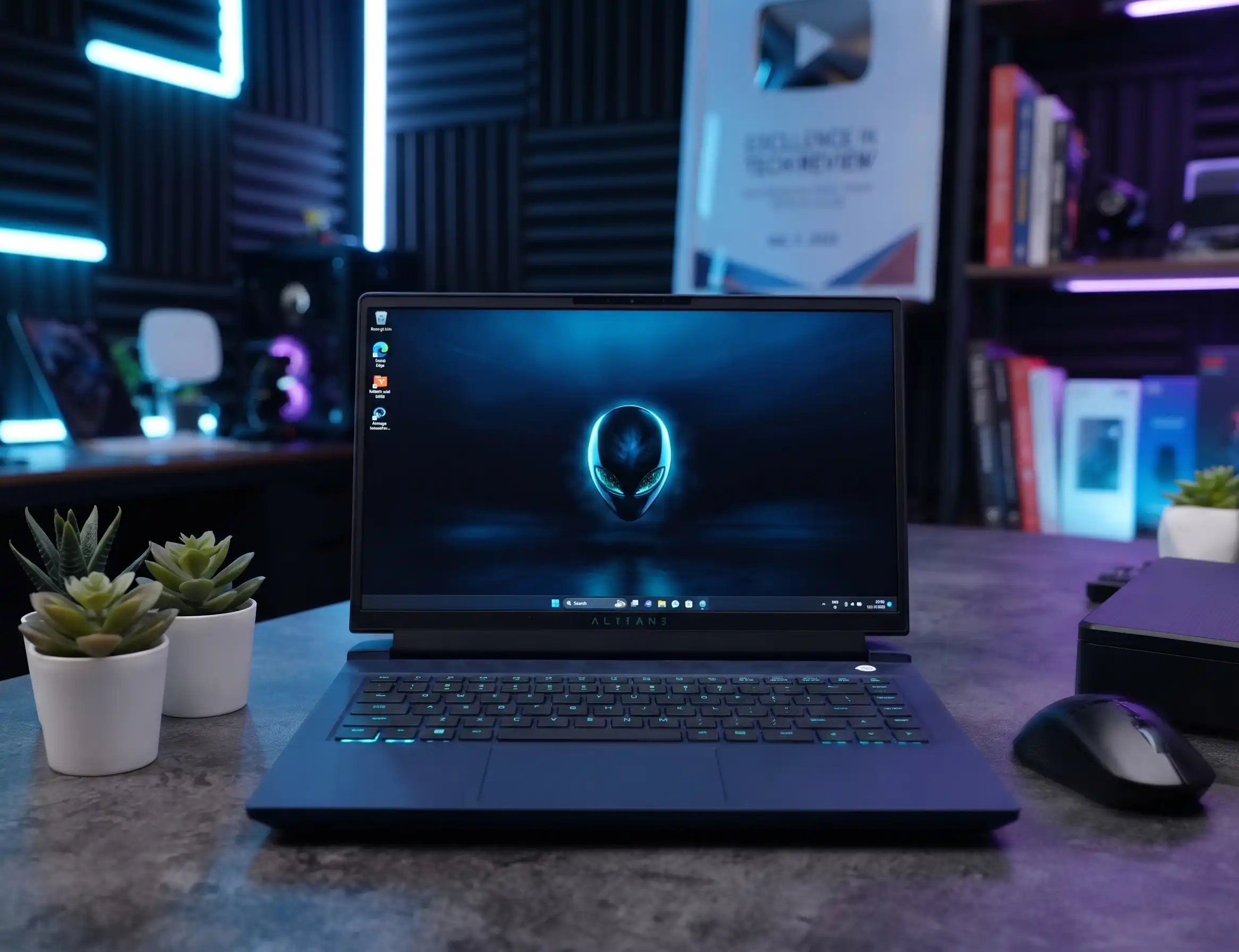
Dell kept the exterior largely unchanged to make room for the new internals. The chassis uses aluminum panels and feels rigid, but the overall look lacks personality. Subtle curves meet hard edges in a way that doesn’t feel cohesive, and the display bezel still carries some thickness left over from the prior IPS panel generation.
At 10.5 x 14 x 0.9 inches and 5.7 pounds, the laptop sits comfortably in the middle of the 16-inch gaming category, though some competitors have trimmed weight more aggressively. The Legion 7i 16 Gen 10, for example, weighs just 4.3 pounds. The bundled 280-watt power adapter is also notably large, even heavier than the Area-51’s 330-watt GaN charger.
Cooling and Comfort
The cooling system pulls air through a bottom intake chamber, similar to the Area-51, though without that model’s transparent panel. Additional intake vents sit above the keyboard, and exhaust vents line both sides and the rear. Fan noise stays minimal, and I didn’t notice significant heat on the keyboard deck or palm rest, even during extended gaming sessions.
Comfort takes a hit at the front edge, where a sharp curve can dig into your wrist depending on hand position. It’s a small detail, but one that adds up over long typing or gaming sessions.
Keyboard, Trackpad, and Display
Typing on the 16X Aurora feels genuinely good. I hit 114 words per minute with 98% accuracy in Monkeytype, thanks to light key resistance and a satisfying spring. The layout includes shrunken arrow keys and a compact number pad, standard for a 16-inch productivity-oriented chassis. Single-zone RGB backlighting is present, though I couldn’t get Alienware Command Center to actually enable it during testing.
The trackpad is serviceable but unremarkable, with a plain click and a surface that isn’t as smooth as the best competitors offer.
The display, on the other hand, is the clear highlight of this machine. At 2,560 x 1,600 resolution, the OLED panel delivers sharp detail and infinite contrast. It hit 404 nits in my testing, with HDR content pushing brighter still. Color accuracy is excellent, covering 100% of both the sRGB and DCI-P3 color spaces, with an average dE1976 of 0.9 and a max of 2.3. Combined with a 240Hz refresh rate and G-Sync support, this panel makes gaming visuals genuinely enjoyable, even though similar OLED panels are becoming more common across the category.
Audio, Webcam, and Connectivity
The speakers put out plenty of volume but sound boxy and become unpleasant when pushed to maximum. During a session with 007: First Light, they still kept pace with the action without getting drowned out by fan noise.
Above the display, a 1080p webcam with IR sensors supports Windows Hello facial recognition. Image quality looks crisp in good lighting, though it turns grainy in dim environments, a common tradeoff for laptop webcams.
Port selection disappoints for a laptop this size. The right edge offers no ports at all. The left edge houses a USB-A 5Gbps port, a 3.5mm audio jack, and Ethernet. The rear holds another USB-A 5Gbps port, a USB-C 10Gbps port, an HDMI 2.1 port, and a Thunderbolt 4 USB-C port. Notably, only that single Thunderbolt 4 port supports USB power delivery input and DisplayPort output, which limits flexibility for anyone wanting to charge via USB-C from multiple sides.
Storage remains upgradeable, with two internal M.2 slots. Buyers who configure the system with a single SSD retain a free slot for expansion later, which is a welcome bit of future-proofing.
Is the Alienware 16X Aurora Worth Buying?
The Alienware 16X Aurora packs serious hardware, but it doesn’t always convert that hardware into a clear performance advantage. The display alone makes a strong case for this laptop, yet it’s no longer a rare feature, since several rivals now ship comparable 240Hz OLED panels.
Cheaper alternatives complicate the value argument further. The HyperX Omen 15 delivers similar real-world performance with “just” an RTX 5070 and offers noticeably longer battery life. The Acer Predator Helios Neo 16S AI matches this machine’s speed and display quality at a lower price point. Given those alternatives, the 16X Aurora has to work harder to earn a recommendation this generation.
Quick Verdict
| Specification | Rating (1–10) |
|---|---|
| Display Quality (OLED, 240Hz) | 9.5 |
| CPU Performance | 7 |
| GPU Performance & Consistency | 6.5 |
| Battery Life | 5.5 |
| Build Quality & Design | 6 |
| Keyboard & Typing Experience | 8 |
| Port Selection | 5.5 |
| Value for Price | 6 |
Pros
- Excellent OLED display with accurate colors and high refresh rate
- Comfortable, responsive keyboard for both typing and gaming
- USB-C charging support
- Expandable storage with a free M.2 slot
Cons
- Only a modest performance improvement over last year’s model
- Design feels dull compared to more distinctive competitors
- Expensive relative to similarly specced rivals
- Below-average battery life, even for a gaming laptop
- Limited port selection for a 16-inch chassis